Check your Friend Pass access
Loading the interactive tool…
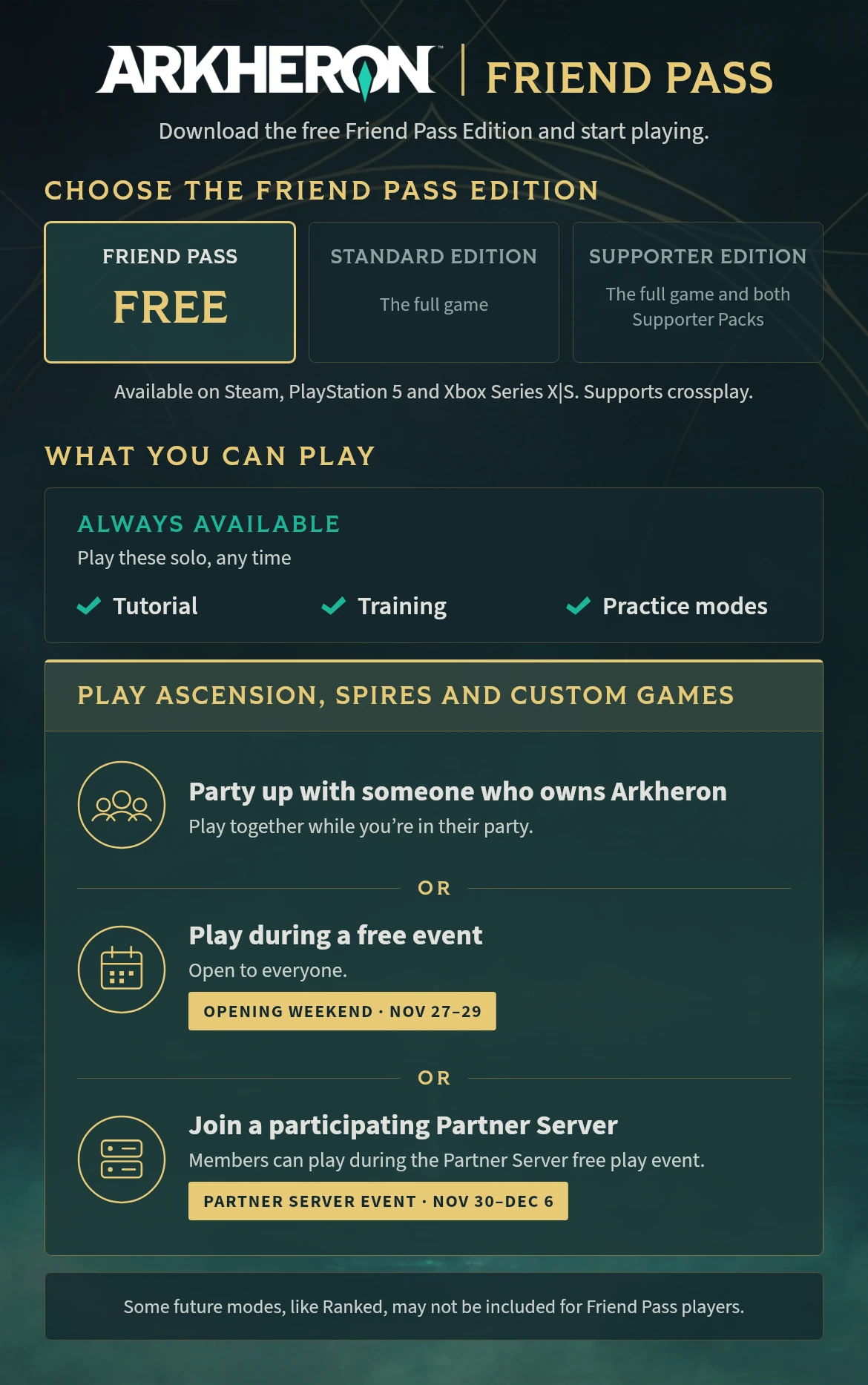
Arkheron Friend Pass is a free edition of the game for Steam, PlayStation 5, and Xbox Series X|S. Start at the official Play Arkheron page, choose your platform, and download the Friend Pass Edition rather than the paid Standard or Supporter Edition. The Xbox Store listing also identifies the Friend Pass as playable on Windows PC.
You can always use the Friend Pass alone for the Tutorial and Training modes. To enter Ascension, Spires, or Custom Games, you normally need to be in a party with at least one player who owns Arkheron. A live free-play event can temporarily remove that owner requirement.
As of November 29, 2026, the launch event is the important exception: Friend Pass players have full access during Opening Weekend. The next exception is Partner Server Free Play Week, scheduled for November 30 through December 6. Arkheron’s announcements give calendar dates but do not publish a precise entitlement-switching hour, so use the enabled mode buttons in the client as the final check around either boundary.
Arkheron Friend Pass eligibility at a glance
| Your situation | What you can play | What you must do |
|---|---|---|
| Playing alone outside a free event | Tutorial and Training | Download and launch the Friend Pass Edition |
| Party includes an Arkheron owner | Tutorial, Training, Ascension, Spires, and Custom Games | Join the owner’s party before selecting a competitive mode |
| Opening Weekend, November 27–29 | Ascension, Spires, and Custom Games without an owner, plus the normal learning modes | Launch Friend Pass while the event entitlement is active |
| Partner Server Free Play Week, November 30–December 6 | Ascension, Spires, and Custom Games without an owner, plus the normal learning modes | Join a participating Discord server, connect Discord, add the server, and select its star in Manage Servers |
| Joined a Partner Server but did not select its star | Normal Friend Pass access only | Rep the participating server in-game; Discord membership alone is not enough |
| After December 6 with no owner in the party | Tutorial and Training | Find an owner’s party or buy the full game for unrestricted access |
The key distinction is ownership at the party level. Friend Pass does not turn your account into a permanent full-game account. Instead, the competitive modes become available when your current party contains an eligible owner or when a qualifying event entitlement applies to you.

How to download the Friend Pass Edition
Use the platform selector on the official Arkheron play and editions page. Look specifically for the free Friend Pass Edition. It is a separate store product from the paid game, so installing an old Playtest client does not satisfy this requirement.
The verified platform choices are:
- Steam on Windows: Install the separate Arkheron Friend Pass application. The paid Arkheron game and Friend Pass have different Steam listings.
- PlayStation 5: Select the Friend Pass product from the Arkheron concept or edition page in the PlayStation Store.
- Xbox Series X|S: Choose Arkheron Friend Pass rather than the paid Game Preview product.
- Windows through the Xbox ecosystem: The Xbox Store’s Friend Pass listing includes Windows PC as a supported device.
After installation, launch the Friend Pass client and complete the opening Tutorial. The current Early Access onboarding then provides learning content and Training modes that remain available even when you have no owner in your party.
Do not confuse Friend Pass with Xbox Game Pass. During the announced Game Preview period, an eligible Xbox Game Pass Ultimate entitlement grants access to the full game. Friend Pass is the separate free option and follows the party and event rules described here.
How regular Friend Pass access works
Under the normal rule, one player in the party must own Arkheron. That ownership can come from a paid Standard or Supporter Edition, and the official editions page also says Xbox Game Pass works with Friend Pass. The remaining members of Arkheron’s three-player party can use the free edition.
No Friend Pass key has to be generated, assigned, or consumed. A Friend Pass player is not permanently tied to one owner. The requirement is simply that an eligible owner be present in the party when the group uses Ascension, Spires, or Custom Games.
A reliable setup sequence is:
- Every free player installs and launches the Friend Pass Edition on a supported platform.
- The owner and Friend Pass players add or locate one another through Arkheron’s social tools.
- Join the same party while everyone is at the main menu.
- Confirm that at least one current party member has full-game access.
- Select Ascension, Spires, or a Custom Game and verify that its start or queue control is enabled.
If the owner leaves, the remaining Friend Pass players should not assume that competitive access will persist. Outside a free-play event, return to a party containing an owner before trying to queue again.
What you can do without an owner
Outside special events, a solo Friend Pass account retains the Tutorial and Training modes. This is enough to complete the guided introduction, learn the controls, examine items, and practice combat before joining a full party.
It does not normally provide independent access to the competitive queues. If Ascension, Spires, or Custom Games are unavailable while you are alone, that is consistent with standard Friend Pass access rather than evidence that the download failed.
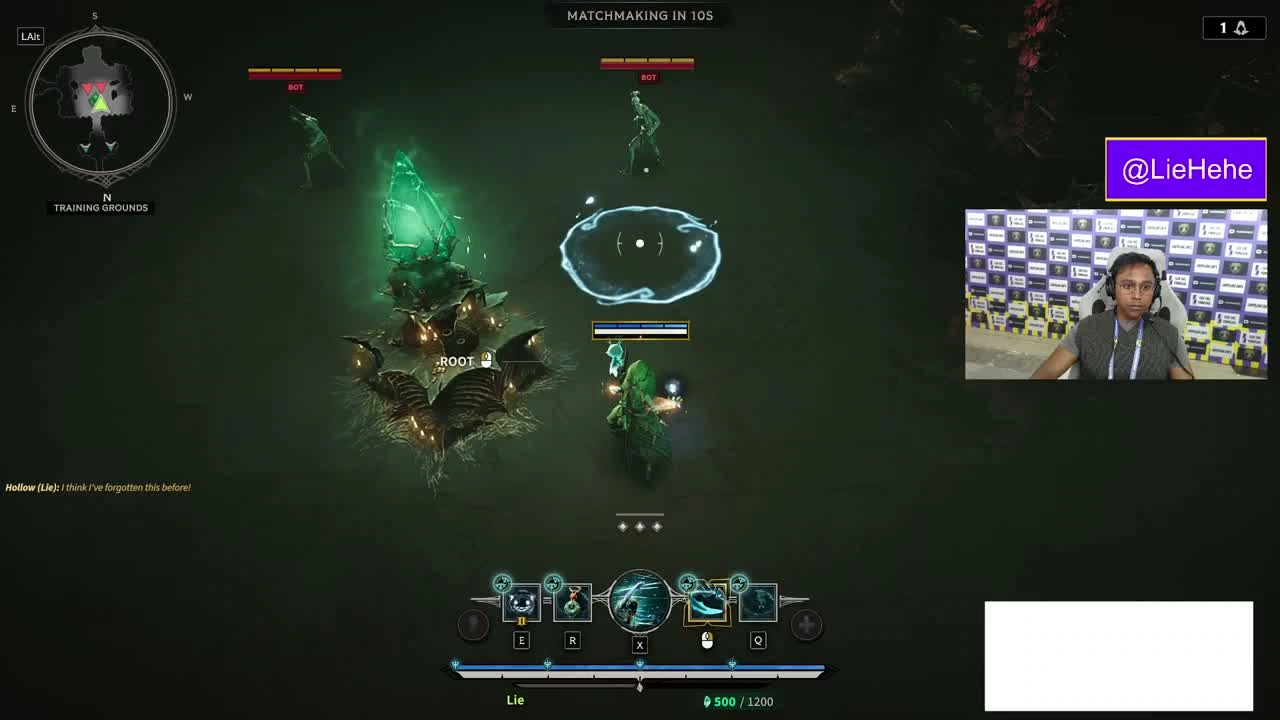
The current Early Access client includes Training Grounds and a training-while-queueing feature. Training while queueing is not a way around the entitlement check: the qualifying party or event still determines whether the competitive queue can start. Once a valid queue begins, the training room can be used while matchmaking runs.
Opening Weekend access on November 27–29
Arkheron’s launch promotion gives Friend Pass players full access during Opening Weekend. During the published November 27–29 window, an owner is not required for Ascension, Spires, or Custom Games. You can queue alone or form a party with other Friend Pass players.
This exception explains why a solo player may see competitive controls enabled during launch and later see only Tutorial and Training. The account has not lost its permanent Friend Pass features; the temporary full-access entitlement has ended.
The official pages use day-based wording for this promotion, while an event listing combines a broader launch-event window with separate reward timing. Because no entitlement-specific cutoff hour is published, do not promise teammates that access will last until a particular local midnight. Near the transition, launch the client and check whether the competitive mode’s queue button remains available.
How Partner Server Free Play Week works
Partner Server Free Play Week is scheduled for November 30 through December 6. During the event, Friend Pass players who rep a participating Partner Server can use Ascension, Spires, and Custom Games without having an owner in their party.
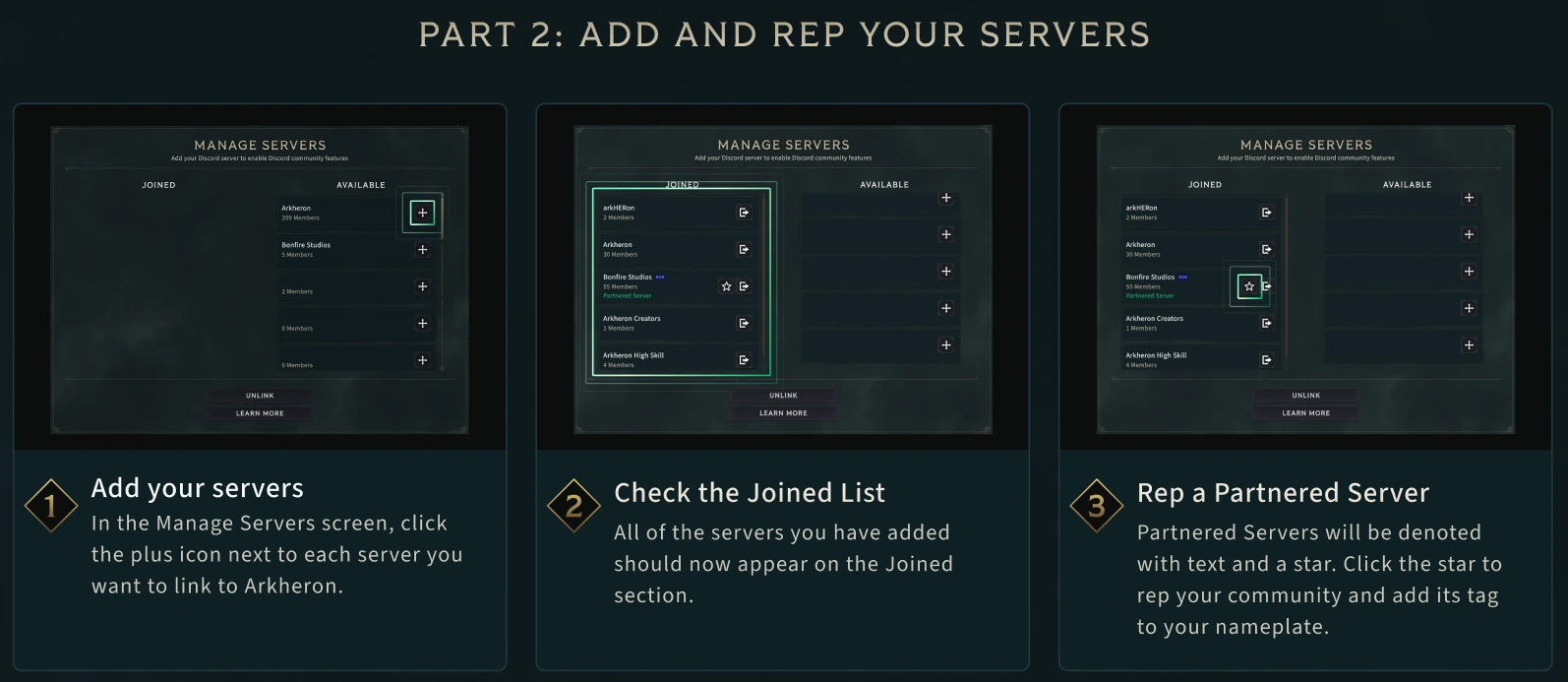
The final official requirement is stricter than simply joining a Discord community. Follow the complete process in the Partner Servers guide:
- Install and launch the Friend Pass Edition.
- Join one of the participating Partner Servers on Discord.
- Open Arkheron’s Social menu.
- Open the Communities tab and select Connect to Discord.
- Approve the account connection in the browser, then return to Arkheron.
- Open Manage Servers and add the participating server with its plus control.
- Find that server in the Joined list and select its star to rep it.
- Confirm that the server is the one currently represented before entering a competitive queue.
Arkheron lets you add multiple communities, but you can rep only one at a time. The selected community must be a participating Partner Server for the free-play entitlement. Joining its Discord, connecting your account, or adding the server without selecting the star does not complete the access process.

After December 6, the official announcement says regular Friend Pass access resumes. Your connected communities and party-finding tools remain available, but they no longer replace the normal owner requirement unless Arkheron announces another applicable event.
Crossplay and mixed-platform parties
Friend Pass supports crossplay across Steam, PlayStation 5, and Xbox Series X|S. The owner and free players do not need to use the same platform. A Steam owner can therefore form a party with Friend Pass players on supported consoles, subject to the normal in-game friend and party process.
Platform choice does not change the core entitlement rule. What matters is whether the party has an eligible owner or the Friend Pass player currently qualifies through a free event. If a mixed-platform group cannot start a mode, check the party roster and entitlement route before treating the problem as a crossplay failure.
Steam players can additionally use Arkheron’s Discord activity integration to advertise or join parties. That invitation feature helps assemble the group, but it does not itself grant Friend Pass access. The resulting party must still contain an owner unless an event exception applies.
Does Friend Pass progress carry over
Yes. The official editions page states that Friend Pass progress carries over if you later buy Arkheron. This makes the free edition suitable for completing onboarding, learning the game, and beginning progression before deciding whether to purchase full access.
Buying the full game changes your access route; it does not require you to discard the progress made through Friend Pass. Use the same Arkheron and platform identity associated with that progress when upgrading. The supplied evidence does not establish cross-platform progression behavior, so do not assume that moving to a different platform account will merge progress automatically.
Troubleshooting locked modes
If a competitive mode is locked, identify which access route should apply before reinstalling anything.
| Symptom | Most likely check | Corrective action |
|---|---|---|
| Only Tutorial and Training are available | No owner is in the party and no free event applies | Join an owner’s party or use a qualifying event route |
| You joined a participating Discord but modes remain locked | The server has not been added and starred in Arkheron | Connect Discord, add the server, and select its star in Manage Servers |
| The server appears under Joined but access is unchanged | You added it but are not currently repping it | Select the star beside the participating Partner Server |
| Competitive access disappeared after launch weekend | The temporary opening promotion ended | Use Partner Server access during its published week, join an owner, or buy the game |
| The group has a paid player but cannot start | The owner may not be in the active party or the group may already be queueing | Return everyone to the main menu, rebuild the party, and confirm the owner is present |
| You installed an older test build | The Playtest client is not the Friend Pass Edition | Install the current Friend Pass product from the official platform route |
The simplest success check is visible in the client: the intended mode can be selected and its queue or start control is enabled for the current party. If that remains false after the applicable steps, verify the account connection and party roster before escalating the issue through Arkheron’s official support channel.